The post Ajax based contact form with captcha demo and example appeared first on Coding Sips.
]]>Before starting have a look at running demo on completing this tutorial we will end up with form like available at this live demo
Here in this article to keep things simple and easy to understand we will
- Start from simple form submission by traditional method
- After that we will make it ajax based
- And then at last we will implement captcha into it
First of all as we will be saving user message into database table, so to create table run this query in your database to create table named tbl_contacts
CREATE TABLE tbl_contacts (

 id int(11) NOT NULL AUTO_INCREMENT,

 name varchar(255) NOT NULL,

 email varchar(255) NOT NULL,

 company varchar(255) NOT NULL,

 phone varchar(255) NOT NULL,

 message text NOT NULL,

 PRIMARY KEY (id)

)
Now create a php file name it contact.php and paste the following simple html code in it, this file will display contact form with fields name, email, company, phone and message.
contact.php
if we open this file in browser, it will display a form like the following snapshot.

Now we will be writing its back-end coding to catch the data submitted and save it in database table. To do so we have to
- Create database connection
- Check if POST request is made
- Grab POST variables, clean it (escape special chars) and assign it to variables
- Make insert query
- Execute query
- Display success or error message
create another php file name it save-contact.php and paste the following code into it. all the code below is explained by comments and list of steps given above.
connect_error)

	{

		echo "ERROR: (".$db->connect_errno.") ".$db->connect_error;

		exit();

	}
//check if POST request is made(via normal for submission or ajax)
if($_POST){
//insert record
insert_record();
}//end if post
/*function to insert data in table*/
function insert_record(){
//access $db inside function
global $db;
//collect post variable data
$name = clean($_POST['txtName']);
$email = clean($_POST['txtEmail']);
$company = clean($_POST['txtCompany']);
$phone = clean($_POST['txtPhone']);
$message = clean($_POST['txtMessage']);
//make query
$qry = 'insert into tbl_contacts (name,email,company,phone,message) values(
"'.$name.'",
"'.$email.'",
"'.$company.'",
"'.$phone.'",
"'.$message.'"
)';
//echo $qry; /*debug qry*/
if($result = $db->query($qry)){
echo 'Message sent successfully, we will get in touch with you soon.';
}else{
echo 'ERROR : '. $db->error;
}
}//end insert_record()
/*function to escape special chars
to prevent sql injection */
function clean($str){
global $db;
return $db->real_escape_string($str);
}//end clean()
?>
If we submit the form it will insert a record in tbl_contacts this was the traditional method of form submission, Now we will be submitting the same form using ajax to do so first of all write a line before ending tag in contact.php to link our script file named myscript.js
Now create a js file name it myscript.js and paste the following code in it.
myscript.js
$(function(){

        //captcha refresh code will come here

	$('#contact-frm').submit(function(e){

		//prevent default fuctionality of form submision

		e.preventDefault();
//make ajax post request
$.ajax({
url:'save-contact.php',
type:'post',
data:{
txtName : $('#txtName').val().trim(),
txtEmail : $('#txtEmail').val().trim(),
txtCompany: $('#txtCompany').val().trim(),
txtPhone : $('#txtPhone').val().trim(),
txtMessage: $('#txtMessage').val().trim(),
},
beforeSend:function(){
display_msg('Wait: Processing','info');
},
success:function(response){
if(response.toLowerCase().indexOf('error')>=0){
display_msg(response,'danger');
}else{
display_msg(response,'success');
//reset form inputs
$('#contact-frm')[0].reset();
//captcha reset code comes here
}
},
error:function(){
display_msg('Some error occured','danger');
/*
visit http://www.codingsips.com/ajax-with-error-handling
for detailed error handling
*/
}
});
});
});
function display_msg(str,type){
//str = error or success message
//type = for success green, for error red
$('.result').html('
').slideDown();
}//end display_msg()
It was all for basic and simple ajax form submission, if you understood above coding 100% then read the next and last portion of implementing captcha in Ajax based contact form, else read and practice it from start until you understand all above code.
To implement captcha in this form we have to do the following things step by step
- Crate a php file to develop captcha image for which we will also need a font_file.ttf
- Show Captcha in contact.php as image and add an extra textbox so that user can enter captcha word
- In myscript.js along with other variables we will have to send captcha word entered by user
- And finally at save-contact.php we will have to verify captcha and than process accordingly
To study captcha coding in detail read my previous article on How to create custom captcha, for now create a php file name it captcha.php and paste the following code in it
Copy alam_font.ttf font file to your project directory and check the following url, it must show captcha
http://localhost/your-project-name/captcha.php
Now open contact.php and locate a comment it is before submit button, paste the following lines of code at location of above comment.
It will display captcha and textbox to enter captcha in form as shown in below snapshot
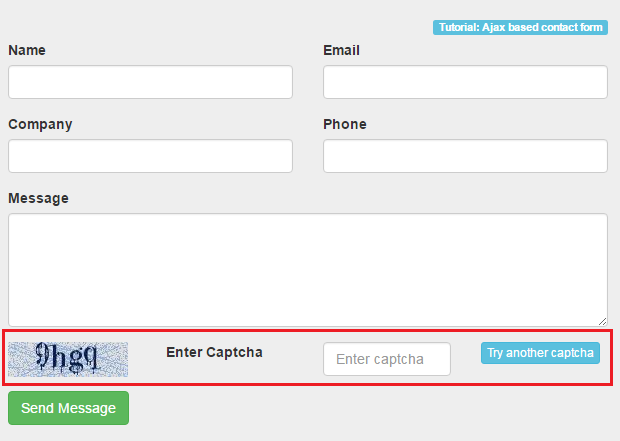
Open myscript.js after line 16 txtMessage: $(‘#txtMessage’).val().trim(), before closing curly brace, write the following line.
txtCaptcha: $('#txtCaptcha').val().trim(),
Now to refresh captcha we have to write a function in myscript.js copy the following code and paste it at line 2 of myscript.js
	$('#refresh-captcha').click(function(e){

		e.preventDefault();

		var d = new Date();

		$('#img-captcha').attr('src','captcha.php?'+d.getTime());

	});
when form is successfully submitted the form is getting reset means all text-boxes are getting empty, along with this captcha should also be refreshed and display new captcha. To do so wite the following link on code in success function inside myscript.js replacing comment captcha reset code comes here just after form resetting at line about 28.
$('#refresh-captcha').trigger('click');
Finally open save-contact.php as we will be checking captcha with session variable so at top of the page after php starting tag write the following line
session_start();
and replace line 16-21 if statement with the following code.
//check if POST request is made(via normal for submission or ajax)

if($_POST){

	if(strtolower($_SESSION['alam_captcha'])==strtolower($_POST['txtCaptcha'])){

		//insert record

		insert_record();

	}else{

		echo 'ERROR: Invalid captcha entered.';

	}
}//end if post
Its all done, if you have not made any mistake will work fine without any error. If you are getting error try and follow the article from beginning. If still have issue write your errors at comments we will try our best to help you.
For demonstration I have skipped designing and form validation etc to reduce amount of code and keep it clean and easier to understand. after successfully completing few times you can customize its design and implement decent validation etc.
A running demo of this tutorial can be found at this link Live demo: ajax based simple contact form with captcha
The post Ajax based contact form with captcha demo and example appeared first on Coding Sips.
]]>