The post Generate bulk barcode in Excel appeared first on Coding Sips.
]]>I generated 500 barcodes today and found it very easy & time saving, that’s why I am sharing it here so that you can have an idea that it can be done in minutes using MS Excel.
- Download this zip file it has font files, and extract it to your windows fonts folder. C:\Windows\Fonts\
It will take few seconds to copy and install - Open MS Excel after installing these fonts so you can apply these new fonts
- Preparing your code for barcode generation
- Make sure the column having your source codes are formatted as Text
- Wrap your codes in parenthesis using below formula in a new column, and double click to repeat it for all rows
=”(“&A2&”)” where A2 is cell index - Select full column and apply font named IDAutomationHC39M Free Version or Code128bWinLarge
I like IDAutomationHC39M Free Version because it also generate the actual code under the barcode.
try it and make your life easy and generate bulk barcodes within few minutes, and be smarter. there is one drawback I can see using this method that we can not download these barcodes as images in one shot.
I do have a script where you can generate one by one barcode but now I am planning to write another script to generate bulk barcode along with option to download all images in a zip file.
keep on visiting this site for interesting things like this.
The post Generate bulk barcode in Excel appeared first on Coding Sips.
]]>The post MySQL Export non English CSV and import in MS Excel appeared first on Coding Sips.
]]>How to export data in CSV format from MySQL using PhpMyAdmin
- Open PhpMyAdmin
- browse table data, put where conditions if required, sort if required etc.
- when you are ready to export, click export link which is shown below

Then select target csv format as shown in snap below
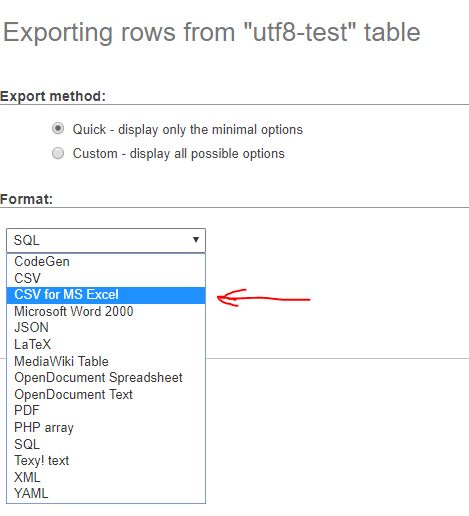
click go button, it will download queried data in a CSV file.
Now coming towards MS Excel
How to import CSV in MS Excel
- open Ms Excel
- go to data tab
- click from file in get external data section, as shown below

just click next, and select proper delimiter like comma or semicolon
it will import data BUT non-English characters will be broken as shown below

Now I will show you how we can avoid this while importing utf-8 or non-English data into MS Excel.
during importing you see an option to select file origin
Select Unicode (UTF-8) as shown below

Now after completing importing your data will be ok, means non-English characters will not be broken. as shown below see Arabic, Urdu, Pashto and Hindi all languages are correctly displayed this time.

The only trick was to select proper File Origin which in this case was Unicode (UTF-8), may be for some other languages and file type you have to select different File Origin, but this is where you can play.
Hope this was easy, share with your friends.
The post MySQL Export non English CSV and import in MS Excel appeared first on Coding Sips.
]]>