The post Arabic English bilingual inputs jquery plugin appeared first on Coding Sips.
]]>Here in this blog we will learn how can we implement Arabic English bilingual inputs jquery plugin in or web application so that users do not need to switch the system input language for each input, instead it will automatically get specified language.
For example if we have specified name_en input to get name in english and user has selected Arabic as his/her system input language, but when he types in this input it will be written in English, and versa for Arabic input.
It is very easy to aply it to your website form inputs, just few steps
Step 1: Download
Download plugin files from this link, it has js and css files, extract to your css and js folders.Step 2: Add Libraries
add this code in your web page head section
Step 3: Form inputs
We have to add 2 attributes to our form inputs these are class=”txtLang” and language of that input data-lang=”en” it must be en or arBelow is sample html code with above 2 attributes with first 5 inputs
Step 4: Apply plugin
Apply plugin to all inputs having class is equal to txtLang as shown in below code, this can be writen in head section or in body of html file.
targetLangis optional, if you are providing here it means it will make all inputs as arabic, while if you are providing data-lang attribute in each input then it will take that for that specific input, so data-lang attribute is specific for each input.
Technically on each keyup it is looping through all characters and converting to specified language key character. if it is Arabic input even you write English it will be converted to English
Similarly if it is English input and you are typing Arabic it will be automatically converted to English, while if you need to enter mix of both languages then you have to click on blue box on top of input to temporarly disable it.
Hope it was easy, will appraciate your constrcutive feedback and comments.
The post Arabic English bilingual inputs jquery plugin appeared first on Coding Sips.
]]>The post Alam input tags jQuery plugin appeared first on Coding Sips.
]]>This plugin can be used with static array of JSON objects or you can also configure it with a URL from where it will get all objects. It will also show different colored tags based on your data. The input data is recommended in our format but it is felxiable to get data having different field names and configure it with fieldMappings, It also has MaxItem and MaxSuggestions options.
Before using it I would suggest to see its demo here
You can download it from here
Features of Alam input tags
- Ajax Or Static Json array of objects
- Colored tags based on object field
- Comma separated ids will be submitted
- In Edit page it will make tags from csv value
- Configurable max number of suggested items
- Configurable max number of items to select
- Fields mapping
How to use Alam input tags
Step 1: Put these css and js files inside head tag
Step 2: Add textbox inside body tag as you doing in normal forms, assign it some unique class or id so that later we can reference this textbox in next step. eg.
Step 3: Now we have to paste JS/JQuery code, you can paste this code in head tag or any where in page, I will recommend to paste this code at end of body tag
$(function(){
    $('.alamInputTag').alamInputTags({
        maxSuggessions:5,
        maxItems:10,
        //url:'src.html',
        data:[
                {"id":1,"name":"Alam","class":"danger"},
                {"id":2,"name":"Bilal","class":"danger"},
                {"id":3,"name":"Khan","class":"success"},
                {"id":4,"name":"Shayan","class":"success"},
            ],
        //fieldMappings:{
        //    id:'no',
        //    name:'text',
        //    class:'class',
        //}
    });
});
Alam input tags options explaination
all options are optional
- maxSuggessions its optional if not provided it will take default 5
- maxItems its optional if not provided it will take default 0 which means no limit
- url url or data one should be there, If both url and data given then data will be overwritten
- data data should be JSON array of objects, the same format will be required in URL too
- fieldMappings (optional if fields names are [id,name,class]) else if your data has different field names e.g
data:[
    {"no":1,"text":"Alam","class":"danger"},
    {"no":2,"text":"Bilal","class":"danger"},
    {"no":3,"text":"Khan","class":"success"},
    {"no":4,"text":"Shayan","class":"success"},
]
then you have to provide fieldMappings as below
fieldMappings:{
    id:'no',
    name:'text',
    class:'class',
}
- 1- Left side of : should not be changed
- 2- Only right side of : should be same as your field names
- 3- Also it should be wrapped in commas
On posting it will post comma separated ids
On edit page you can make value=”1,3,6″ it will convert it to tags automatically from csv ids.
Hope this was easy and helpful
The post Alam input tags jQuery plugin appeared first on Coding Sips.
]]>The post Emirates ID reader and Google Chrome via Extension and Console App (old) appeared first on Coding Sips.
]]>Emirates ID Reader in Chrome
by alampk.com
1.1- Download required dlls and console app and extract it.
1.2 You will need .net framework 3.5 64 bit installed to run above app
2.1- Go inside extracted folder and Double click install_host.bat file to create registry key.
3.1- Download chrome extension named ADCS EID Reader from Google chrome webstore.
3.2- For coding help open readme.html and see what code is there, you can update control ids and classes but I have the following
3.3- In you page the following html objects should be there
- .simulateEidResponse (hide it using css in production mode)
- #txtNationalNumber
- .btn-readCard
- optional, if you are not keeping these than you have to modify .simulateEidResponse click event accordingly.
- .eid-wrapper
- .spinner-border
4- Insert card, read it and chill
Some developers contacted me that it is now working with them even trying many time, I have updated zip folder and also added EIDA_SDKSetup_V2.8.1.exe
I hope installing this app will install all required dlls and other dependancies. so request those friend developers to install this also, they might get out of the issue.
The post Emirates ID reader and Google Chrome via Extension and Console App (old) appeared first on Coding Sips.
]]>The post Basic steps to implement JQuery datatables plugin appeared first on Coding Sips.
]]>Some important and most commonly used basic features are
- Fast as it executes at client
- Nice table design
- Pagination
- Define records per page
- Column wise sorting
- Search/Filter
Some other advanced features which are not mostly used but these are also very handy and time saving but to use these features you may need to add additional JS library.
- Show hide columns
- Export to CSV, PDF etc
- Columns re-ordering
- Fixed Header
- Fixed Column
- Ajax Server side processing
- And many more explore it at datatables.net
Jquery Datatables Requirements
To use any Jquery plugin or writing any JQuery code you will always need JQuery library (jquery.js).
and to use datatables basic features listed in first list above you just need jquery.dataTables.js file to get its basic functionality with basic or minimum design. You can also use dataTables.bootstrap.js to give a decent look to your table but this is not mandatory you can write your own designing code.
Minimum Code for using Jquery Datatables plugin
1- Write HTML page at head section include the following 3 files
- jquery.js
- jquery.dataTables.js
- dataTables.bootstrap.js (this one is optional)
you can download it from datatables.net/download/packages it may have many other files too but search above 3 files and include in you head tag as show in the following code.
2- Write a script tag where you can write your own JQuery, and write ready function, inside ready function initiate datatable plugin it is easy just one line of code.
Datable plugin
| name | city | phone | company |
|---|---|---|---|
| Colette Bush | Dudzele | 0800 795226 | Porttitor Inc. |
| Ima Copeland | Tay | 0800 419165 | Morbi Incorporated |
| Alika Flynn | Borsbeek | (024) 9862 3756 | Vestibulum Ante Institute |
| Kennan Calhoun | Schönebeck | 0337 460 3593 | Amet Consulting |
| Ezra Fischer | Dufftown | 076 1000 8386 | Dui In Sodales Ltd |
| McKenzie Shepard | Minitonas | (017966) 53185 | Risus Nulla Eget Industries |
| Forrest Maxwell | Bonvicino | 056 8634 2856 | Posuere Cubilia Inc. |
| April Fitzpatrick | Tauranga | 0847 328 2762 | Congue Incorporated |
| Jorden Chase | Lumaco | 0500 141203 | Eu Nulla At Ltd |
| Mufutau Snider | New Orleans | 0500 825697 | Sed Et Inc. |
| Dominic Faulkner | Meux | 07624 778700 | Dui Consulting |
| Tallulah Sellers | Massemen | 0800 1111 | Dolor Sit Amet Company |
| Cassandra Frazier | Cuccaro Vetere | 0996 872 8065 | Erat PC |
| Brooke Trevino | Gignod | (0117) 861 9823 | Eget Nisi Dictum Industries |
| Kennedy Rosa | Fremantle | 07258 479997 | Purus Mauris A Industries |
| Regina Hooper | Arviat | (0119) 863 2853 | Blandit Ltd |
| Lara Taylor | Caerphilly | (016013) 87337 | Congue In Associates |
| Lev Vaughn | Güssing | (01854) 339546 | Integer Consulting |
| Dale Pitts | Potsdam | (0191) 402 6683 | Aliquet Consulting |
| Uriah Pearson | Temuka | (01887) 28613 | Aliquet Metus Industries |
| Edward Faulkner | Ghaziabad | 0845 46 45 | Velit Egestas Limited |
| Ivana Floyd | Palagianello | (016977) 6849 | Posuere Cubilia Curae; Institute |
| Whilemina Gilbert | Serampore | 0895 684 5725 | Parturient Montes Nascetur PC |
| Desirae Horne | Armidale | 0914 385 9997 | Fringilla Associates |
| Ivana Cole | Görlitz | (016977) 9823 | Consequat Dolor Vitae Foundation |
| Kendall Holt | Lorient | (01383) 498208 | Mus Foundation |
| Vera Ortega | Radom | 07624 851816 | Feugiat Placerat Velit Inc. |
| Cleo Lamb | Hertsberge | 070 7383 3607 | Litora Incorporated |
| Alexander Spencer | Alnwick | 070 4846 5798 | Nec Inc. |
| Allegra Fuentes | Rocky View | 0800 1111 | Sem Ut Industries |
| Nina Valentine | Mechelen-aan-de-Maas | (01570) 34165 | Non Magna Institute |
| Samson Flores | Anzegem | 0800 083616 | Eu Tempor Institute |
| Naida Mann | Carovilli | (016977) 8119 | Velit LLP |
| Evangeline Kramer | Wekweti | 07825 021458 | Rhoncus PC |
| Dahlia Hill | Comox | (0181) 824 9848 | Velit Dui Semper Inc. |
| Kim Chan | Bouwel | 0845 46 44 | Dictum Phasellus Associates |
| Elliott Mcguire | Paradise | 056 9713 8867 | Lacinia Consulting |
| Madison Vega | Shadiac | 056 2780 0465 | Interdum Ligula LLP |
| Dakota Stokes | Westport | 055 0300 4075 | Hendrerit Inc. |
| Trevor Burke | Aurora | 0845 46 49 | Sodales PC |
| Jermaine Zimmerman | Laurencekirk | (01305) 815844 | Sodales Institute |
| Jemima Jacobson | Lauro de Freitas | 076 5920 5887 | Aliquet Company |
| Cassandra Boyle | Ussassai | 0800 269682 | Elit Pharetra Ut Associates |
| Wendy Best | Gonda | 070 9247 9965 | Ante Vivamus Non Incorporated |
| Ivana Greene | Feltre | (01156) 237035 | Amet Consectetuer Associates |
| Owen Luna | Kharagpur | (027) 1050 2032 | Metus Foundation |
You can see running demos of jquery datatables plugin here at this link Datatable Demo
3- You can modify its default functionalities like sorting, searching, pagination and many other by providing as options to dataTable function we have written at line 21 in above code. try replacing line 21 with the following code and see the changes.
$('#my-table-1').dataTable({

	paging: false,

	ordering:false,

	scrollY: 300,

});
Paging : false means remove pagination feature
ordering: false means remove sorting feature
scrollY: 300 means make table height=300 and show scrollbar
There are hundreds of other options open this official link Datatable options. explore it on you own, play with it and let us know if you have any problem.
This was the basic implementation of Jquery Datatables plugin with minimum libraries and minimum code required, we can do more advanced things with it by adding other libraries like I have listed in second list above.
keep on visiting codingsips for daily handy coding tips and short tutorials and second version of this tutorial datatables beyond the basics coming soon. where we will cover few commonly used advanced features of Datatables.
The post Basic steps to implement JQuery datatables plugin appeared first on Coding Sips.
]]>The post Ajax based contact form with captcha demo and example appeared first on Coding Sips.
]]>Before starting have a look at running demo on completing this tutorial we will end up with form like available at this live demo
Here in this article to keep things simple and easy to understand we will
- Start from simple form submission by traditional method
- After that we will make it ajax based
- And then at last we will implement captcha into it
First of all as we will be saving user message into database table, so to create table run this query in your database to create table named tbl_contacts
CREATE TABLE tbl_contacts (

 id int(11) NOT NULL AUTO_INCREMENT,

 name varchar(255) NOT NULL,

 email varchar(255) NOT NULL,

 company varchar(255) NOT NULL,

 phone varchar(255) NOT NULL,

 message text NOT NULL,

 PRIMARY KEY (id)

)
Now create a php file name it contact.php and paste the following simple html code in it, this file will display contact form with fields name, email, company, phone and message.
contact.php
if we open this file in browser, it will display a form like the following snapshot.

Now we will be writing its back-end coding to catch the data submitted and save it in database table. To do so we have to
- Create database connection
- Check if POST request is made
- Grab POST variables, clean it (escape special chars) and assign it to variables
- Make insert query
- Execute query
- Display success or error message
create another php file name it save-contact.php and paste the following code into it. all the code below is explained by comments and list of steps given above.
connect_error)

	{

		echo "ERROR: (".$db->connect_errno.") ".$db->connect_error;

		exit();

	}
//check if POST request is made(via normal for submission or ajax)
if($_POST){
//insert record
insert_record();
}//end if post
/*function to insert data in table*/
function insert_record(){
//access $db inside function
global $db;
//collect post variable data
$name = clean($_POST['txtName']);
$email = clean($_POST['txtEmail']);
$company = clean($_POST['txtCompany']);
$phone = clean($_POST['txtPhone']);
$message = clean($_POST['txtMessage']);
//make query
$qry = 'insert into tbl_contacts (name,email,company,phone,message) values(
"'.$name.'",
"'.$email.'",
"'.$company.'",
"'.$phone.'",
"'.$message.'"
)';
//echo $qry; /*debug qry*/
if($result = $db->query($qry)){
echo 'Message sent successfully, we will get in touch with you soon.';
}else{
echo 'ERROR : '. $db->error;
}
}//end insert_record()
/*function to escape special chars
to prevent sql injection */
function clean($str){
global $db;
return $db->real_escape_string($str);
}//end clean()
?>
If we submit the form it will insert a record in tbl_contacts this was the traditional method of form submission, Now we will be submitting the same form using ajax to do so first of all write a line before ending tag in contact.php to link our script file named myscript.js
Now create a js file name it myscript.js and paste the following code in it.
myscript.js
$(function(){

        //captcha refresh code will come here

	$('#contact-frm').submit(function(e){

		//prevent default fuctionality of form submision

		e.preventDefault();
//make ajax post request
$.ajax({
url:'save-contact.php',
type:'post',
data:{
txtName : $('#txtName').val().trim(),
txtEmail : $('#txtEmail').val().trim(),
txtCompany: $('#txtCompany').val().trim(),
txtPhone : $('#txtPhone').val().trim(),
txtMessage: $('#txtMessage').val().trim(),
},
beforeSend:function(){
display_msg('Wait: Processing','info');
},
success:function(response){
if(response.toLowerCase().indexOf('error')>=0){
display_msg(response,'danger');
}else{
display_msg(response,'success');
//reset form inputs
$('#contact-frm')[0].reset();
//captcha reset code comes here
}
},
error:function(){
display_msg('Some error occured','danger');
/*
visit http://www.codingsips.com/ajax-with-error-handling
for detailed error handling
*/
}
});
});
});
function display_msg(str,type){
//str = error or success message
//type = for success green, for error red
$('.result').html('
').slideDown();
}//end display_msg()
It was all for basic and simple ajax form submission, if you understood above coding 100% then read the next and last portion of implementing captcha in Ajax based contact form, else read and practice it from start until you understand all above code.
To implement captcha in this form we have to do the following things step by step
- Crate a php file to develop captcha image for which we will also need a font_file.ttf
- Show Captcha in contact.php as image and add an extra textbox so that user can enter captcha word
- In myscript.js along with other variables we will have to send captcha word entered by user
- And finally at save-contact.php we will have to verify captcha and than process accordingly
To study captcha coding in detail read my previous article on How to create custom captcha, for now create a php file name it captcha.php and paste the following code in it
Copy alam_font.ttf font file to your project directory and check the following url, it must show captcha
http://localhost/your-project-name/captcha.php
Now open contact.php and locate a comment it is before submit button, paste the following lines of code at location of above comment.
It will display captcha and textbox to enter captcha in form as shown in below snapshot
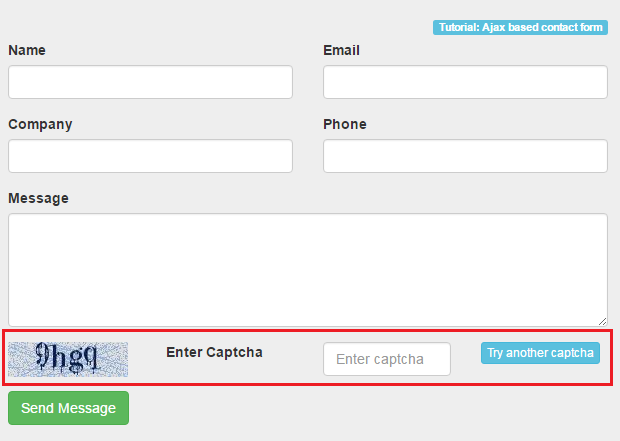
Open myscript.js after line 16 txtMessage: $(‘#txtMessage’).val().trim(), before closing curly brace, write the following line.
txtCaptcha: $('#txtCaptcha').val().trim(),
Now to refresh captcha we have to write a function in myscript.js copy the following code and paste it at line 2 of myscript.js
	$('#refresh-captcha').click(function(e){

		e.preventDefault();

		var d = new Date();

		$('#img-captcha').attr('src','captcha.php?'+d.getTime());

	});
when form is successfully submitted the form is getting reset means all text-boxes are getting empty, along with this captcha should also be refreshed and display new captcha. To do so wite the following link on code in success function inside myscript.js replacing comment captcha reset code comes here just after form resetting at line about 28.
$('#refresh-captcha').trigger('click');
Finally open save-contact.php as we will be checking captcha with session variable so at top of the page after php starting tag write the following line
session_start();
and replace line 16-21 if statement with the following code.
//check if POST request is made(via normal for submission or ajax)

if($_POST){

	if(strtolower($_SESSION['alam_captcha'])==strtolower($_POST['txtCaptcha'])){

		//insert record

		insert_record();

	}else{

		echo 'ERROR: Invalid captcha entered.';

	}
}//end if post
Its all done, if you have not made any mistake will work fine without any error. If you are getting error try and follow the article from beginning. If still have issue write your errors at comments we will try our best to help you.
For demonstration I have skipped designing and form validation etc to reduce amount of code and keep it clean and easier to understand. after successfully completing few times you can customize its design and implement decent validation etc.
A running demo of this tutorial can be found at this link Live demo: ajax based simple contact form with captcha
The post Ajax based contact form with captcha demo and example appeared first on Coding Sips.
]]>The post Step by step JQuery Ajax file upload with progress bar appeared first on Coding Sips.
]]>now a days as websites are made advanced most of the things are being performed by ajax, file upload can also be performed via ajax as background process, not only that we can get continuous status of upload and show user how much file is uploaded by displaying a decent progress bar.
Before starting have a look at demo at this link JQuery-Ajax-file-upload-progressbar. we will be creating something like this.
Step for JQuery Ajax file upload with progress bar
We can submit our file and text data via ajax, how to handle things?
- write form submit event using JQuery and prevent default functionality as
$('body').on('submit','#frm',function(e){

e.preventDefault(); - Create FormData object as
var data = new FormData(); - Assign it file as
data.append('file', frm.find( '#txtFile' )[0].files[0]); - We can assign other data too like
data.append('title',frm.find('#txtTitle').val()); - Create httpRequest object as
var ajax = new XMLHttpRequest(); - bind events to above object as below code
        ajax.upload.addEventListener('progress',function(evt){

		       //we will get progress here and update progressbar

		},false);

		ajax.addEventListener('load',function(evt){

		       //this event will be fired when upload completes

		},false);

		ajax.addEventListener('error',function(evt){

                //this event will be fired when some error occurs

		},false);

		ajax.addEventListener('abort',function(evt){

                //this event will be fired when file upload is aborted

		},false);
- assign method and url to ajax object as
ajax.open('POST',url); - call send method of ajax object as
ajax.send(data);
This is all, you just have to handle and code above 4 events as you need it. the following 2 snapshots displays how images out form will be looking during file uploading and the send one displays when file upload is completed.
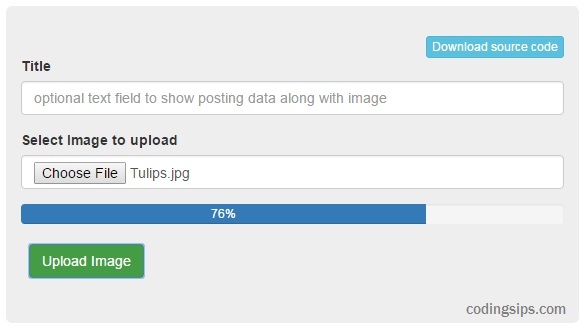

to view running demo click this link jquery-ajax-file-upload-progressbar, if you want to download complete source code of this demo click this link Download source code customize and make changes according to your requirements and needs. let me know if you have any issues I will try my best to help you out.
The post Step by step JQuery Ajax file upload with progress bar appeared first on Coding Sips.
]]>The post How to preview image before uploading with JQuery appeared first on Coding Sips.
]]>Basically we will have to write our code on Change event of file input. which means when ever user changes image the preview will be changes and there will be no page reload, it will happen in no time.
Click the following button to view live demo of how to preview image
Demo of Image Preview
As code is just few lines so I will include whole page code here.
txtFile is id of file input
imgPreview is id of img tag where we have to preview image
Jquery code id written at end of body tag.
An Example to preview Image before uploading
The post How to preview image before uploading with JQuery appeared first on Coding Sips.
]]>The post An example of basic ajax with jquery and error handling appeared first on Coding Sips.
]]>we can perform ajax request using JavaScript as well as Jquery, As JQuery requires less code so I always prefer Jquery over JavaScript. in this tutorial I will do it with JQuery.
lets take an example, we have 2 dropdowns 1st one is country with id=”drpCountries” and 2nd one is city with id=”drpCities”, we populate countries using php while want to fetch cities from database when we change the country at runtime.
our HTML will look like the following snippet
for above script our php code will look like something below
query($sql);

    $cities= array();

    while($row = $res->fetch_array()){

       $cities[$row['id']]=$row['city_name'];

    }

    echo json_encode($cities);
?>
You can customize it according to your requirements, I kept it more generic and simple for beginners to understand easily. comment your issues and problems and I encourage you also to reply i you can help someone else.
The post An example of basic ajax with jquery and error handling appeared first on Coding Sips.
]]>The post Jquery plugin to Print specific div with applied CSS appeared first on Coding Sips.
]]>This plugin will allow you to print specific html object along will all css applied on it.
its simple to use.
- include jquery library
- include print-preview.js plugin
- initiate plugin and provide target html object to print
you can specify many other options like want to send additional css to be applied, width/height and more
<script type="text/javascript">
        $(function(){
            $("#btnPrint").printPreview({
                obj2print:'#masterContent',
                width:'810'

                /*optional properties with default values*/
                //obj2print:'body',     /*if not provided full page will be printed*/
                //style:'',             /*if you want to override or add more css assign here e.g: "<style>#masterContent:background:red;</style>"*/
                //width: '670',         /*if width is not provided it will be 670 (default print paper width)*/
                //height:screen.height, /*if not provided its height will be equal to screen height*/
                //top:0,                /*if not provided its top position will be zero*/
                //left:'center',        /*if not provided it will be at center, you can provide any number e.g. 300,120,200*/
                //resizable : 'yes',    /*yes or no default is yes, * do not work in some browsers*/
                //scrollbars:'yes',     /*yes or no default is yes, * do not work in some browsers*/
                //status:'no',          /*yes or no default is yes, * do not work in some browsers*/
                //title:'Print Preview' /*title of print preview popup window*/

            });
        });
    </script>
The post Jquery plugin to Print specific div with applied CSS appeared first on Coding Sips.
]]>